Since they are impossible to find on the net here is the list of all base location uri's in eclipse that are used in the org.eclipse.ui.menus extension point:
menu:org.eclipse.ui.main.menu // the top-level menu
popup:org.eclipse.ui.popup.any // all pop-up menus
toolbar:org.eclipse.ui.main.toolbar // the top-level tool bar
toolbar:org.eclipse.ui.trim.command1 // the top left trim (main toolbar area)
toolbar:org.eclipse.ui.trim.command2 // the top right trim (perspective switcher area)
toolbar:org.eclipse.ui.trim.vertical1 // the left vertical trim
toolbar:org.eclipse.ui.trim.vertical2 // the right vertical trim
toolbar:org.eclipse.ui.trim.status // the status line trim
to access the menu/toolbar/popup of a part (view or editor):
menu:partid //the part's chevron menu
toolbar:partid //the part's toolbar (cannot contain other toolbars)
popup:partid //the part's popup menu (register the context menu in createPartControl first)
zaterdag 2 juni 2012

zondag 18 maart 2012
Design a Nebula Logo and win $100
The Short Story
The Nebula project needs a new Logo. File a new logo design using this bug and you could win $100.Showcase your logo here: http://wiki.eclipse.org/Nebula/Artwork
The Long Story
The Eclipse Nebula project is slowly moving out of incubation. Artifacts of this process are going to be stable releases, continuous builds and easy to get documentation.A new design of the Nebula website will be part of this although I fear that it will be quite hard to get resources for this job.
When looking at the great design of the Xtext website, I must admit that I am a little jealous. Because nothing drives production better than competition, I thought it was time for a new Logo for the Nebula project.
A great designer is somewhere inside me, waiting to blossom, but, to be completely honest, when I show my creations to people, I often get advice to hire some professional help. Nevertheless, I was thinking that an Ambigram would make a nice Nebula Logo. When designed properly, Ambigrams are clear on their own but can be read upside-down as well. So after fiddling around with it a little bit, this was the result.


We decided to open a bug and make a real contest out of it. So far we have the following proposals. If you can do better, help us out and you could win $100. The logo will be chosen by the readers of the Nebula-Dev mailing list (you can subscribe here).

zaterdag 18 februari 2012
News from Eclipse Nebula
 Every time I teach one of my RCP classes I take some time to discuss the Nebula project. An RCP application is not complete without at least one of these beautiful widgets. In our own applications we make extensive use of the Nebula project.
About a year and a half ago I managed to get one of my own widgets in the project as well and so i became a Nebula committer. Yay!
Tom, Nicolas and others did a lot of work restructuring the project at that time but it got stalled. IIRC this was mainly due to problems getting the Eclipse infrastructure working for us and Tom being buried in e4.
However, this left us with an unfinished build, no official download site and as a result some of the widgets were self-hosted. In the mean time new widgets were offered to the project that did not get enough attention. A few weeks later, Tom send a message to the list. After pondering it for a while, I decided to volunteer for the position as project lead on a temporary basis (read: you will never get rid of me).
 Restructure
Since then we managed to get the project going again. My first action as wannabe project lead was to move forward with Mickael Istria's Treemapper that was waiting to be accepted. I filed a CQ to the EMO to get the Treemapper through the IP process.
I could not know at the time that this was a smart move because Mickael proved to be a build magician and together with Nicolas we managed to complete our (Tycho) build, with test, signing and upload to the Eclipse download server. There are now only a few seconds between a check-in and the availability of the code on the Eclipse download servers.
Housekeeping
The next steps in the restructuring was the move to git, restructure and refactor of the widgets (we are no longer in the swt namespace), the completion of the restructure documentation and finally the proposal of the new project structure.
New Widgets
In the mean time, new widgets are included into the Nebula project. So please allow me to introduce:
TreeMapper
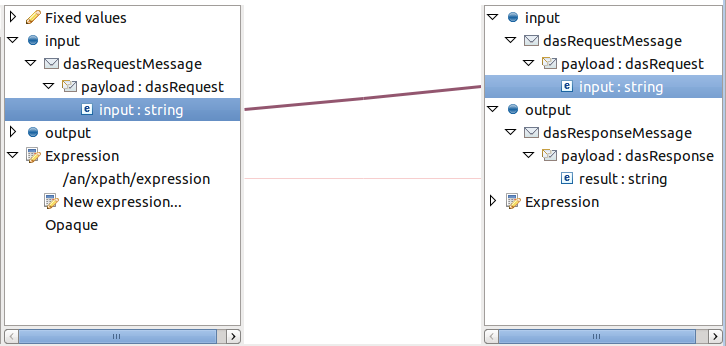
Mickael's TreeMapper widget can be used to link entries in two trees by using drag and drop. It can be used for mapping fields to tables, users to capabilities, eggs to sausages, and so on. Read all about it.
Picture Control
A widget made by Angelo Zerr and Pascal Leclerq. It is a widget for easy picture control. It enables upload and display of a picture and, it also runs in RAP. Read all about the Picture Control.

Another brand new widget by Angelo and Pascal is the Pagination Control. There are some good use cases when you have to work with large data sets. We know the pagination paradigm from the web but why should that not be available on the desktop. So here is a good alternative to lazy content providers and virtual trees and tables. Did I already mention that it also runs in RAP? Read all about the Pagination Control.

NatTable
Now it is time to wait for the legal stuff to happen in the NatTable proposal. NatTable is currently self-hosted so go over there and take a look. We have been using NatTable in our own product and we are very happy with it's versatility and speed. All the better that this is coming to Eclipse Nebula. Edwin Park will be the lead of the sub-project and we are looking forward to find a good place for NatTable in Nebula.

Example View
Checkout the widgets by downloading them from our update site. Make sure to also include the example view and the examples of these widgets.
Cheers,
Wim
vrijdag 4 maart 2011
Is Waldo a bundle? RELENG Problems!

However, looking for stuff is not alway's fun. "Au Contraire" as the French would say. Looking for stuff is the biggest time waster in the universe. It is the energy that feeds frustration and can drive a man to madness.
Feature Based Products
Feature Based Products
Feature based products are the way to go. They are easy in maintenance, p2 aware and we have some support for them in Eclipse. However, features are not a development artifact. They are releng artifacts.
Then, after a few cycles of hacking at bundles, the time comes to bundle the bundles into features. Making a good separation into features requires some wizard like qualities, but to find the features for other bundles requires a fair amount of guessing, knowing and, of course searching.

Look no more
 Inside Eclipse there is some API that enables us to retrieve the installed features and go right into the bundles that are associated with that feature. Available in the Market Place is a view that is called the "Feature Explorer". It uses this information to show the current platform features and contains a search box. You type the name of the bundle into the search box and the view tells you in which feature(s) is it bundled.

Thanks to the Waldo guys for letting me use their stuff!
Then, after a few cycles of hacking at bundles, the time comes to bundle the bundles into features. Making a good separation into features requires some wizard like qualities, but to find the features for other bundles requires a fair amount of guessing, knowing and, of course searching.

Look no more
 Inside Eclipse there is some API that enables us to retrieve the installed features and go right into the bundles that are associated with that feature. Available in the Market Place is a view that is called the "Feature Explorer". It uses this information to show the current platform features and contains a search box. You type the name of the bundle into the search box and the view tells you in which feature(s) is it bundled.
Thanks to the Waldo guys for letting me use their stuff!
maandag 16 augustus 2010
Extreme Feedback from the Nebula: The Oscilloscope
Extreme Feedback
When I was reading the Hudson manual a few days ago, I came across a section called "Extreme Feedback" where people are experimenting with feedback from the build system. Devices vary from cute bears to traffic lights and actual smell emitters.
Now I am looking for an genuine hospital heartbeat monitor to top all that. If you find one, let me know.

Until that time ...
We are currently building a new software machine that is based on OSGi services. Some of these services are really important and without them the machine will not run. For example, there is the Store service to persist and retrieve data. I don't know why but a few months ago I got this idea that a dashboard with some heartbeat monitors would be a nice way to a) impress our customers and b) to get immediate feedback in case one of the services would die. 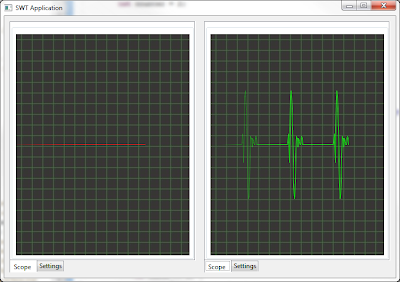
After playing around for a few hours on a sunny Sunday when I should really not sit behind my computer, the first version of the OSGilloscope was born. I especially liked the name, but changed it later. The first version was slow as a snail and consumed all of my CPU and I had to tinker quite a bit to be able to run many scopes without problems.
After adding a few nice options, including sound (Heartbeat, Flatline, ..) I asked the Nebula guys if they wanted to have it, and they did!
I have included the scope into the Nebula Examples view. If you want to take a look please follow these five easy steps:
1. Start Eclipse with a new workspace
2. Create a java project
3. Create a file called widget.psf and load it with this content
4. Right click on the file and select "Import Project Set ..."
5. Open the nebula.product file from the example project and press "Launch an Eclipse Application"
After this is done, open the Oscilloscope tab and play around with the options. It is a lot of fun.
How to use the scope
If you want to use the widget please look at the included snippets project. You can just launch each snippet as a Java application. The widget comes with a special abstract OscilloscopeDispatcher class that keeps the animation running if you call the dispatch() method.
It does that by putting a request on the Display queue with a delay of 10-n milliseconds. The higher the delay, the slower the scope will run. You can specify the delay by implementing the
getDelayLoop() method. Off course, the scope wants to display a value. You get an opportunity to put a value in the scope every "Pulse". The value of the pulse can be specified by implementing the
getPulse() method. If the pulse is 60 and the delay loop is 20 then every 1200 milliseconds something can be displayed in the scope. This can be a single value which will spike the scope by calling the getOscilloscope().setValue(int) method or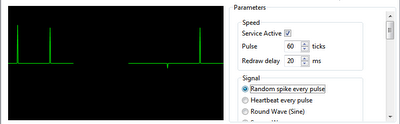
it can be a value series by calling the
getOscilloscope().setValues(int[]) method. e.g. the Oscilloscope.HEARTBEAT field will draw a heartbeat like shape. The aforementioned method can lose values if you overflow the stack. The stack is circular meaning that if you push too many values in the method then the tail will overwrite the top. If you want to draw something in "real time" then the pulse must be set to one. This will give you the opportunity to input a value every cycle.
Alternatively you can register a listener that gets notified if the stack is empty. An example of this can be found in Snippet4.
Please give it a spin. All feedback is appreciated, even extreme feedback.
woensdag 9 juni 2010
Helios Bloghaton: Fun with Eclipse Remote Services - 1
In many hotels there is no 13th floor, let alone a room with number 13. Everyone knows that there are 13 steps leading up to the gallows and if you suffer from friggatriskaidekaphobia then you don't like Friday the 13th.
Nevertheless, the OSGi Alliance decided to assign number 13 to the Remote Services chapter. This is particularly creepy since the book starts with Chapter 1 and then jumps straight to chapter 13. After chapter 13 the next one is numbered 101. It is as if the Alliance almost wanted to proof that superstition is just that.
Eclipse Remote Services Implementation
And the proof sticks because Chapter 13 is a great chapter. ECF has implemented the remote services specification in February with the 3.2 release of ECF. Remote services come in two parts Discovery [1] and Distribution [2]. This article is about remote services in combination with the new Zookeeper based discovery provider.
And the proof sticks because Chapter 13 is a great chapter. ECF has implemented the remote services specification in February with the 3.2 release of ECF. Remote services come in two parts Discovery [1] and Distribution [2]. This article is about remote services in combination with the new Zookeeper based discovery provider.

To the fun
We have created a few Example projects to show you how remote services work and the user interface of this one is depicted above. It uses a cool new SWT Widget which I have named the OSGilloscope (watch out for a separate blog on this subject.) The other part of the UI consists of a tabbed folder. On one page a new quote is displayed every 15 seconds by a discovered remote service, and on the other page there is information about this remote service.
Get the sources
Please fire up a Helios with a new workspace and get the two bundles needed for this example from this project set** (copy this file in a project, give it the extension .psf, right click and choose Import Project Set...).
** Our recent move of non-epl code to github has rendered the psf file unusable for the org.eclipse.ecf.services.quotes project. Please get these projects from github and import it using "File/Import../Existing projects into workspace" and then point to the archive.
If this is a fresh Helios then you also have to download the ECF components. Point your p2 to http://download.eclipse.org/releases/helios and get the Communication Framework extensions from the EclipseRT project.
Run it
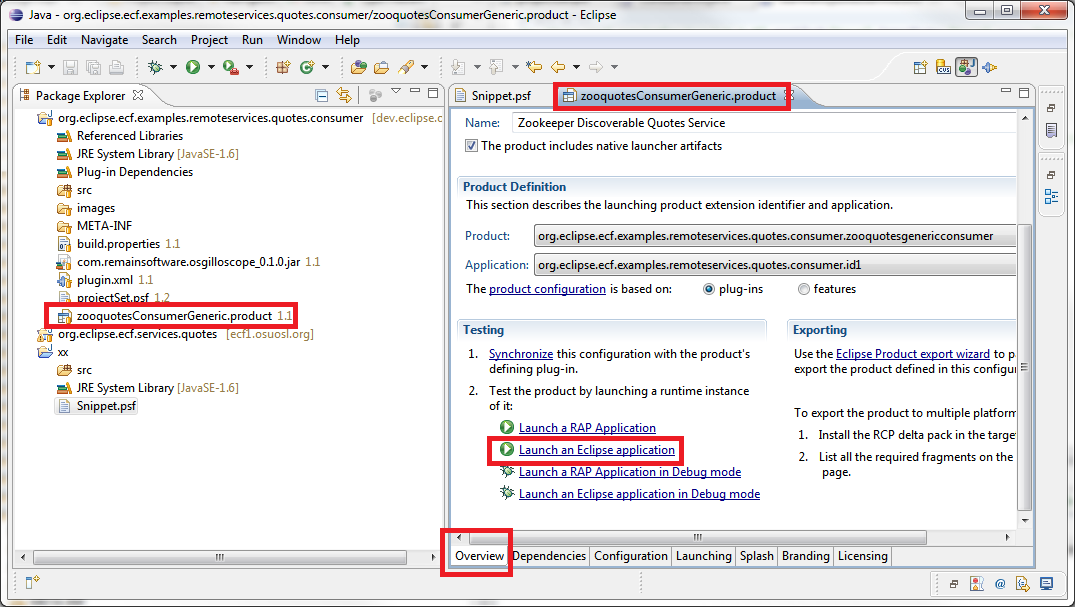
Inside the consumer bundle there is a file ending with .product. Open it and click on the link "launch an Eclipse application".

Yazafatutu.com
My server is named after somebody I once met in a dream. A long and strange story which I will tell you for a beer at Eclipse Summit Europe. This server is hosting the other side of this example and it uses ECF Zoodiscovery which in turn uses Apache Zookeeper from the Hadoop project. Zookeeper servers can be grouped to form a network of continuously synchronizing servers. Zookeeper is designed to replicate configuration data and it does that very fast and very reliable.
At Yazafatutu.com I have started an OSGi container and in there the ECF remote services and Zoodiscovery are running. Zoodiscovery is configured to run in StandAlone mode which means that there is no replication but only one central server. A so called hub-and-spoke configuration.
 In this OSGi container there are three implementations of the QuoteService interface which is located in the other project you have just downloaded: org.eclipse.ecf.services.quotes. Each implementation resides in a separate bundle and the bundles are started and stopped one by one. Starting a bundle causes the Zoodiscovery software to broadcast a publication message to its clients.
 Eclipse Twitter
Press the connect button on your user interface and your client will connect the the Zoodiscovery instance running on yazafatutu.com. After a few seconds, your OSGilloscope will come to live and quotes are shown every time a new bundle is started on the server. One of the three implementations of the QuoteService runs an Eclipse Twitter quote service. If you are on twitter then your quote could be there as well!

The Info tab
The Info tab shows some information about the discovered server. Take a look at the "component id" property because that conveniently counts the number of times a service was published. You can see from its count that the ECF Discovery service can handle a few publications. It needs about 25 weeks to hit a cool million. At the time of this writing it has run about 4 days.
How does it work
It is very easy once you know how. The application itself is a cross between a standalone Java application and an RCP, which is an interesting concept in itself. When the product is started, the Application class is given control. In the start method, the UI is setup and then a listener is installed to listen for service publications. This code is very easy to follow. For every service that comes in, it is checked to be a QuoteService. If this is the case then the UI is updated. The ECF remote services takes care of the remoting and your service is published as if it was a local service.
Please remember to place your code in a try block: You are working with remote services. If the remote server shuts down or decides to stop the service, the communication framework will throw an Exception. You always have to be aware of the fact that OSGi services are dynamic and remote services even more. Code in a defensive way suitable for network programming.
How is the framework started
Please look at the Configuration tab of the product configuration. A few of bundles are started to make sure that the underlying framework is initialized. The connect button of the UI does the manual work by creating a Container which is the ECF concept for an endpoint.
-Dzoodiscovery.autoStart=true
-Dzoodiscovery.flavor=zoodiscovery.flavor.centralized=yazafatutu.com
try {
zooContainer.connect(
zooContainer.getConnectNamespace().createInstance(
new String[] { "zoodiscovery.flavor.centralized="
+ getServers().getText() }), null);

-Dzoodiscovery.autoStart=true
-Dzoodiscovery.flavor=zoodiscovery.flavor.centralized=yazafatutu.com
Conclusion
This is a small example on how to use the ECF Zoodiscovery from a consumer perspective. Various parts of Zookeeper can be configured to achieve an optimum for your specific needs and network. More information can be found on the Eclipse wiki about the configuration of Zoodiscovery.
Many thanks to the developers of OSGi, Equinox, Zookeeper and ECF for enabling us to glue this together to this very useful piece of software.
Need Help?
We can help you with professional services and training to implement this and other parts of Eclipse. Please drop a line to sales@industrial-tsi.com for more information.
We can help you with professional services and training to implement this and other parts of Eclipse. Please drop a line to sales@industrial-tsi.com for more information.
Links
donderdag 20 mei 2010
Opinion: The Class of Projects
This blog is about projects that are not backed up by companies. We, Eclipse users, are very lucky that there are still companies and individuals that invest in time and money for projects like Equinox, ECF, Platform, JDT, CDT, etc..
I learned from Arnoud Engelfriet that there are three types of projects: Base, Commodity and Differentiator.
Base:
If we look at end users, nobody gives a damn about the base because it is just not visible. What does a user care if Eclipse runs on Equinox or on a homegrown executable or if it runs on Swing or on SWT? However, it is needless to say how important these projects are.
Commodity:
These are projects that are an expected part of the product but that are visible to the user. In case of a IDE, think of completion, refactoring, project management, team support, etcetera. The user cares about these things but they are a part of every Java IDE and if you don't have it, you are not in the game. However, it is needless to say how important these projects are.
Differentiator:
Now we come to the interesting business projects because this is stuff that no other IDE has. Think projects as Mylyn, Swordfish, Rienna, etcetera. Needless to say how important these projects are.
Differentiators form an interesting business area and you see that these projects are mostly backed up by companies who can and will help their committers and contributors with infrastructure.
If you are a project that is a Base or Commodity project and not backed up by a company then it can be hard to get funding. A recent example is the Eclipse telecommunication infrastructure.
I end up paying $40 every week for a teleconference call with our group because the foundation does not have a local dial-in for my country. Use Skype you say. Sure we will if it is possible but you know that Skype does not always operate as expected when teleconferencing with people around the world and we don't want to waste time with technical issues (thats the first time I ever said that).
The foundation has no money to pay for this infrastructure. I respect that but who will pay for it then?
In other words, it can be very hard for a Base or Commodity project to get proper funding.
And this is also something that the Foundation should be aware of. It is logical that the parents are very proud of the children who are popular but the other children need attention too.
Base and Commodity projects do not get enough attention. Not only in terms of funding, but also in terms of marketing power, love and mentions. When was the last time SWT was placed in the spotlight?
Abonneren op:
Posts (Atom)