Posts tonen met het label OSGi. Alle posts tonen

woensdag 9 juni 2010

Helios Bloghaton: Fun with Eclipse Remote Services - 1

In many hotels there is no 13th floor, let alone a room with number 13. Everyone knows that there are 13 steps leading up to the gallows and if you suffer from friggatriskaidekaphobia then you don't like Friday the 13th.

Nevertheless, the OSGi Alliance decided to assign number 13 to the Remote Services chapter. This is particularly creepy since the book starts with Chapter 1 and then jumps straight to chapter 13. After chapter 13 the next one is numbered 101. It is as if the Alliance almost wanted to proof that superstition is just that.


Eclipse Remote Services Implementation
And the proof sticks because Chapter 13 is a great chapter. ECF has implemented the remote services specification in February with the 3.2 release of ECF. Remote services come in two parts Discovery [1] and Distribution [2]. This article is about remote services in combination with the new Zookeeper based discovery provider.


To the fun
We have created a few Example projects to show you how remote services work and the user interface of this one is depicted above. It uses a cool new SWT Widget which I have named the OSGilloscope (watch out for a separate blog on this subject.) The other part of the UI consists of a tabbed folder. On one page a new quote is displayed every 15 seconds by a discovered remote service, and on the other page there is information about this remote service.

Get the sources
Please fire up a Helios with a new workspace and get the two bundles needed for this example from this project set** (copy this file in a project, give it the extension .psf, right click and choose Import Project Set...).

** Our recent move of non-epl code to github has rendered the psf file unusable for the org.eclipse.ecf.services.quotes project. Please get these projects from github and import it using "File/Import../Existing projects into workspace" and then point to the archive.

If this is a fresh Helios then you also have to download the ECF components. Point your p2 to http://download.eclipse.org/releases/helios and get the Communication Framework extensions from the EclipseRT project.

Run it
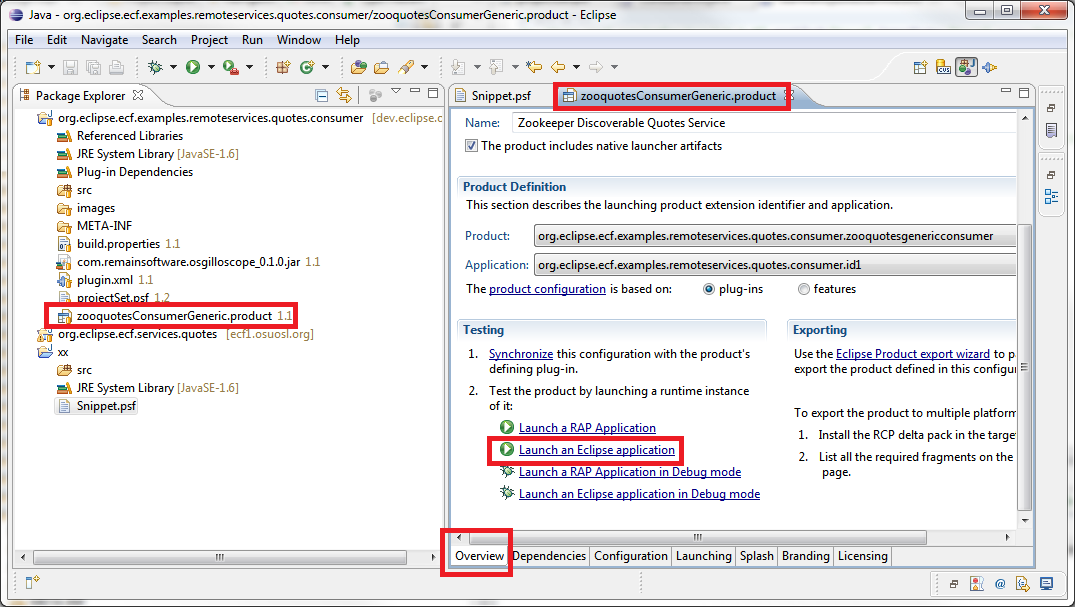
Inside the consumer bundle there is a file ending with .product. Open it and click on the link "launch an Eclipse application".

Yazafatutu.com
My server is named after somebody I once met in a dream. A long and strange story which I will tell you for a beer at Eclipse Summit Europe. This server is hosting the other side of this example and it uses ECF Zoodiscovery which in turn uses Apache Zookeeper from the Hadoop project. Zookeeper servers can be grouped to form a network of continuously synchronizing servers. Zookeeper is designed to replicate configuration data and it does that very fast and very reliable.

At Yazafatutu.com I have started an OSGi container and in there the ECF remote services and Zoodiscovery are running. Zoodiscovery is configured to run in StandAlone mode which means that there is no replication but only one central server. A so called hub-and-spoke configuration.

In this OSGi container there are three implementations of the QuoteService interface which is located in the other project you have just downloaded: org.eclipse.ecf.services.quotes. Each implementation resides in a separate bundle and the bundles are started and stopped one by one. Starting a bundle causes the Zoodiscovery software to broadcast a publication message to its clients.

Eclipse Twitter
Press the connect button on your user interface and your client will connect the the Zoodiscovery instance running on yazafatutu.com. After a few seconds, your OSGilloscope will come to live and quotes are shown every time a new bundle is started on the server. One of the three implementations of the QuoteService runs an Eclipse Twitter quote service. If you are on twitter then your quote could be there as well!


The Info tab
The Info tab shows some information about the discovered server. Take a look at the "component id" property because that conveniently counts the number of times a service was published. You can see from its count that the ECF Discovery service can handle a few publications. It needs about 25 weeks to hit a cool million. At the time of this writing it has run about 4 days.

How does it work
It is very easy once you know how. The application itself is a cross between a standalone Java application and an RCP, which is an interesting concept in itself. When the product is started, the Application class is given control. In the start method, the UI is setup and then a listener is installed to listen for service publications. This code is very easy to follow. For every service that comes in, it is checked to be a QuoteService. If this is the case then the UI is updated. The ECF remote services takes care of the remoting and your service is published as if it was a local service.

Please remember to place your code in a try block: You are working with remote services. If the remote server shuts down or decides to stop the service, the communication framework will throw an Exception. You always have to be aware of the fact that OSGi services are dynamic and remote services even more. Code in a defensive way suitable for network programming.

How is the framework started
Please look at the Configuration tab of the product configuration. A few of bundles are started to make sure that the underlying framework is initialized. The connect button of the UI does the manual work by creating a Container which is the ECF concept for an endpoint.
try {
zooContainer.connect(
zooContainer.getConnectNamespace().createInstance(
new String[] { "zoodiscovery.flavor.centralized="
+ getServers().getText() }), null);
Clients most of the time run in centralized mode and point to a server with configuration information and so does our client. We can remove the manual connect by setting the following Java options:

-Dzoodiscovery.autoStart=true
-Dzoodiscovery.flavor=zoodiscovery.flavor.centralized=yazafatutu.com

Conclusion
This is a small example on how to use the ECF Zoodiscovery from a consumer perspective. Various parts of Zookeeper can be configured to achieve an optimum for your specific needs and network. More information can be found on the Eclipse wiki about the configuration of Zoodiscovery.

Many thanks to the developers of OSGi, Equinox, Zookeeper and ECF for enabling us to glue this together to this very useful piece of software.

Need Help?
We can help you with professional services and training to implement this and other parts of Eclipse. Please drop a line to sales@industrial-tsi.com for more information.

Links


woensdag 31 maart 2010

ECF Discovery: How many Zookeepers does it take to screw in a lightbulb?

image:zookeeperecf.gif
If you use OSGi remote services (See OSGi Compendium Specs chapter 13) you have to know the other end. In large installations this configuration can be quite cumbersome.

At Remain Software we develop software to manage nodes in a network. We want our nodes to register themselves to us when they are in the network. This is fine if you manage a small office but not if you manage smart lightbulbs in a sky scraper.

As soon as the lightbulb is screwed into its socket, it can tap some power to activate its OSGi runtime. The runtime will activate the ILightBulb interface with methods dim(int), on() and off() as a remote service. Now, how do we get this service to interested parties...

ECF For the Win
The ECF discovery framework enabled us to create a Zookeeper based Discovery implementation. An addition to the already existing JmDNS (Zeroconf/Bonjour) and jSLP implementations.

An Apache Zookeeper server will replicate configuration data between other Zookeeper servers. The Zookeeper servers know each other and clients know one Zookeeper Server. So the smart bulb (which runs OSGi or did I mention that already?) is preconfigured with the address of its nearest Zookeeper server or gets this information dynamically by some kind of IP broadcast.

image:zookeeperecf.gif

When the lightbulb publishes its Remote Service, ECF wakes up and publishes this service through the provided Discovery implementations. The Zookeeper discovery provider will immediately notify its nearest peers and the new lightbulb service is registered in all Zookeeper instances. When the Zookeeper instance that is connected to an interested party receives the data, the Discovery implementation will publish this service in that OSGi container.

The Lightbulb Control Center is waiting for the ILightBulb service and magically creates a UI in its console (the sparkles DO NOT appear in reality. I made that up).

The Building Maintainer can now control the lightbulb.


More..
For more information or if you want to Tinker with the code, please visit the wiki.

Acknowledgements
Ahmed Aadel, one of the great developers working at Remain Software created the Zookeeper Discovery Implementation. Thanks to Scott Lewis and Markus Kuppe from our ECF team for support and Chris Aniszczyk for easy access to Tinkerbell (tm)

Animations done with the Gimp.

maandag 21 december 2009

Am I Fragment or am I Bundle

Sometimes you want to know if there are fragments attached to a bundle so you can perform some logic. Eclipse's Platform class is able to help you in this area because it lets you get a list of BundleDescription objects like this:

BundleDescription[] binfos = Platform.getPlatformAdmin().getState(false).getBundles();
for (BundleDescription bundleDescription : binfos) {
if(bundleDescription.getHost() != null)
System.out.println("I am Fragment");
}

maandag 16 november 2009

OSGi: GESUNDHEIT!

This blog is about the upcoming OSGi course run by Neil Bartlett. If you are writing moderate to large size Java applications and you have heard about OSGi but are still a little puzzled about what it does: OSGi is the biggest thing that happened to Java this century. Here are three reasons why this is the case:

1. OSGi enforces modularity
Making systems modular feels good to every engineer. It is just a logical thing to do when systems grow. We define and design modules in our systems. But once implemented, they cannot be taken out or replaced by a better version because they get entangled so quickly. When coding OSGi style, this will not happen. Why? Read on.

2. OSGi defines module boundaries
One reason modularity is enforced is because you define a clear entrance point in your modules which is the interface to the rest of your system. No unclear API due to many public classes, but a well defined set of visible classes that were meant to be API. The rest is hidden, public or not public. Why is this handy?

3. OSGi helps you manage complexity.
Once you can see your modules as giant blocks of LEGO(tm) (having a clear interface) you can think about what the weak blocks are and how they can be replaced or hardened. Do all your work inside the module but be faithful to the interfaces with the outside world. This is how they build Skyscrapers.

Although it sounds to good to be true, true it still is. And even though OSGi sounds like a sneeze, it is all about the GESUNDHEIT of your applications.

We host an OSGi course in December. There are a few places left. Neil Bartlett will be your teacher. By the way, Neil did write the book, a free book and the eye opening first chapter is right here.

Apart from the course we will take you on a Amsterdam by Night tour where you will get a good, but not too good, impression of the unique Amsterdam culture. It is about 30 minutes drive from the training location to the center of Amsterdam.

See you there!


dinsdag 6 oktober 2009

Eclipse API tools: Execution Environments

This content first appeared on the Eclipse Wiki!


Execution Environments in API Tools

Execution Environments (EE) are a neat concept within OSGi, however, things can become complicated when developing against multiple EEs. When you want to contribute code to Eclipse, chances are that you will be asked to downgrade your code to the lowest possible execution environment.

For example, suppose that you want to contribute a Twitter client to Eclipse, or any other open source platform. If you are already accustomed to the OSGi way of working you would probably want to split your code into several independent bundles (AKA modules or plug-ins). At least you would provide a module named org.eclipse.twitter.core and one called org.eclipse.twitter.ui. To be really useful, it would be the bomb if the core bundle could run on, say, a watch. For watches, and other minimal devices there is a special Java environment which is a subset of Java 1.4 (without regular expressions unfortunately) called Foundation 1.1 or CDC 1.1/Foundation 1.1. There is also a Foundation 1.0 but this is really stone age and hardly not used. From what I know, Eclipse uses the 1.1 as a minimum level.

Your org.eclipse.twitter.ui package would normally not require such a primitive environment, however, if somebody wanted to implement a twitter client on a watch, he or she could at least use your core to handle the difficult stuff.

Specify an Execution environment

Specify an Execution Environment


Execution Environments for a specific (plug-in) bundle can be specified in the manifest editor. It is generally only necessary to specify the lowest EEs that your bundles require. In the preferences there is also a section Execution Environments in the Java section. Just type "exec" in the preference search box to get the indicated page. This merely states which installed JRE's are able to provide the required Execution Environment. It is clear that a Java 5 JRE cannot provide a Java 6 Execution Environment. The other way around is possible but that generally provides more than is required and can lead to confusion.

Java Execution Environments Preference Page


For example, a Java 5 JRE can provide the "split()" method for String but this method is not available in Foundation 1.1. Even if your execution environment was set to CDC 1.1/Foundation 1.1 in your manifest file, this problem would only be detected when it was executed against a Foundation 1.1 JRE.

Setup API Tooling

However, we want Eclipse to guard this and warn us when we try to use illegal (future) methods or classes. In order to set this up, we first have to get the available execution environments from the Eclipse update site. In order to do this, go to the preferences and type 'API' in the search box. Then select the "API Errors/Warnings" page. If you open the first section "General" and select "Error" for the "Invalid references ..." field, the "Supported Environments" box will be accessible and you can click on the provided link.

Enable the Supported Environments dialog


Clicking this link will open the familiar P2 installer dialog. Select the proper download site and then download all available Execution Environments.

Downloading the Execution Environments


Make sure to switch on the required Errors and/or Warnings. There are convenient buttons available to flip all switches at once to the desired state. Be restrictive if you are serious about your execution environment.

Result

Activating the Project for API tooling

The last thing to do is to activate the project for API tooling, only setting the Execution Environment in the Manifest file will not do anything. Before a project is created, you are able to specify if the API Tooling must be activated by checking the "Enable API Analysis" field.

Activate API Tooling

This will set a project nature that in turn provides special builder classes to check for EE JRE incompatibilities (amongst other things.) If you have forgotten to check this box then you can also do it later. Right-click your plug-in project and select the "API Tooling Setup" option from the PDE Menu in the context menu. This will apply the nature after the project was already created.

Activate API Tooling

A dialog box will appear to warn you that an API baseline is not set. You can ignore this if you only want to use the API tooling to specify the Execution Environment.

API Tooling warning

Checking your Source

Surely, some of your sources will be showing the red cross. Open a source. Press CTRL+. (dot) to go to the first error and hoover to find the cause. This could look something like this:

API Tooling in Action


Many thanks to the PDE team for this great tool!

woensdag 19 augustus 2009

Running Equinox OSGi and ECF on the System i - Part 2

In the previous installment of this series I have demonstrated what it takes to run OSGi on the AS/400 (or System i as it is called today.)

Goal
In this part we take the OSGi installation one step further by adding additional bundles to the initial installation. A bundle is OSGi slang for a group of Java classes that together perform certain tasks. They are also called modules or plug-ins (because of their plug and play nature).

Remote Services
As I mentioned earlier, our company is in the process of creating a multiplatform SCM for which we need a Multiplatform Communication Layer. Multiplatform can be mapped to Java and Communication Layer translates to the Eclipse Communication Framework, ECF. Since we have already decided to use the OSGi technology as the runtime container, we were also looking for a OSGi defined solution. As you might know, OSGi only provides specifications. It is up to others, like the people from Eclipse and Apache, to write an implementation. One of the new specifications in the upcoming OSGi release is referred to as RFC 119. It describes how an OSGi service should be addressed remotely.

Remote Services is important to us because we have to sometimes manage several hunderds end-nodes. Beeing able to do so in standard OSGi makes us free from the choice of using one specific remoting solution. The RFC 119 technology enables us to choose from different implementations and we have tried both the Apache and the Eclipse implementation.

Cleanup the OSGi installation
If you have followed the previous article, you will notice that there are a lot of bundles in the plugins directory. For our current purpose we don't need all of them and we also want to be as clean as possible. So we are going to move all the unused bundles to a special directory called "Equinox Bundles" we can get to this directory if we need another bundle later. Create a directory with the name "Equinox Bundles" in the /QOpenSys/Equinox directory and move all the bundles in the "plugins" directory into this directory. Now copy back the three jars from the "Equinox Bundles" directory that start with:
  • org.eclipse.equinox.common
  • org.eclipse.osgi
  • org.eclipse.update.configurator
and are followed by a version number and a build identifier.

Setup the configuration.ini
OSGi is configured using the config.ini file in the installation directories 'configuration' directory. OSGi already created this directory for you after the first launch. If it is not there, please see the first article and run the framework.

Now we are going to create the config.ini file with the following content:

osgi.bundles=org.eclipse.equinox.common@2:start, org.eclipse.update.configurator@3:start
eclipse.ignoreApp=true
osgi.install.area=file:/Qopensys/Equinox/plugins/
osgi.console=667
osgi.noShutdown=true

Line 1 instructs the OSGi framework to first start the common bundle and then the configurator bundle. The configurator bundel will automaticall
y install all plugins that are located in the plugins directory of the install directory. In the next step we will put all of our non-framework bundles in that directory.

Line 4 will listen at the TCP/IP port 667 with a telnet server. You can use putty or any other client to telnet to port 667 of this machine. It will give you the console and enables you to run the OSGi framework in a batch job and still be able to control it. Mind you that many OSGi installations happily run without a console or are controlled through other means (e.g. a controlling bundle).

Running as a Batch job
To run the OSGi framework as a batch job start the following command (adapted to the id of your download)

SBMJOB CMD(JAVA CLASS('/QOpenSys/Equinox/plugins/org.eclipse.osgi_3.5.0.v20090520.jar')) JOB(OSGI)

Now fire up your favourite telnet client and try to access port 667. Keep in mind that you can only connect one session at a time.

Now type the "ss" command to show that the framework is running and indeed all our bundles are active.


The exit command will stop the framework and exit. The disconnect command will terminate the telnet session but will leave the framework running.


Setup ECF
Since we are Eclipse junkies we setup our distribution server with the ECF software from Eclipse. So download the ECF SDK. If this link is broken then just go to the Eclipse site and navigate to the ECF SDK and get the zip. Then drop all the bundles from this zip into the '/QOpenSys/Equinox/plugins/plugins' directory. That is correct, two plugins directories.

The reason for this is the org.eclipse.osgi.configurator bundle. It will install all bundles that are found in the plugins directory for us so we don't have to do that ourselves. Since we have installed OSGi in the /QOpenSys/Equinox/plugins directory, we have two directories with this name.


Now stop the framework and submit the job again. Telnet to port 667 and try the "ss" command. This time you will see a lot more. You can filter the list to show only the active bundles by using "ss -s active"

The Next Time
The next time we will create two plugins. One will consume the remote service that the other will provide.

Thank you for your feedback


vrijdag 31 juli 2009

Running Equinox on the System i - Part 1


For our next version of TD/OMS, which is our System i based Software Change Management System, we are moving to OSGi. Since a large part of the processing involves the management of the local System i file system we also need to setup OSGi on this machine.

Okay so the first thing to do is to determine which OSGi implementation to install. Since we are an Eclipse foundation member the first thing to try is the Eclipse implementation of OSGi called Equinox. Equinox has its own page at http://www.eclipse.org/equinox and there is a quick start guide.

The quick start guide instructs us to download Equinox from the download site and sure enough there is a 25 mb drop. After downloading the contents of the zip we can safely say that there is too much in this file but we will worry about that later.

Installing Equinox on the AS/400
I have arranged network access to the IFS so the first thing to do is determine a location. For this I have picked the QOpenSys file system which I always use for long filename and case sensitive related stuff. In the QOpenSys file system I create an Equinox directory and then I copy the plugins directory from the drop into this directory.

According to the getting started guide I would now be able to run equinox with the following command. java -jar org.eclipse.osgi_3.2.0.jar -console

On the System i and translated to the correct jar in the plugins directory (yes you have to look that up yourself) this looks like this:

JAVA CLASS('/QOpenSys/Equinox/plugins/org.eclipse.osgi_3.5.0.v20090520.jar') PARM('-console')

The 5250 java console pops up and after a while the message "Attaching Java program to /QOpenSys/Equinox/plugins/org.eclipse.osgi_3.5.0.v20090520.jar." appears. This is the indication that the jar file was found and that the System i is now compiling all class files to local digestable classes.

And sure enough, after a short while we see the OSGi console. To check all the installed bundles we enter the command "ss" and there, in all its glory, is the org.eclipse.osgi bundle.

I would call this a completely painless operation.

In the next part I will try to install ECF and some homegrown bundles


maandag 16 maart 2009

Package naming convention in a mixed Java and OSGi world

The "standard" before OSGi was to move all internal stuff into *internal* packages.

IBM uses the *internal* approach in the ready for rational program:

Requirement: General 2.5
a)      Provide a list of non-public Eclipse interfaces and the methods used by your offering...

This means that IBM exports *internal* packages and asks for a rationale if you use one of its internal classes. This approach enables you to:
  1. point the programmers to the correct way to use the software
         OR 
  2. move the class out of internal and into the official API.
In OSGi, if you do not export a package, the programmer cannot access it. However, this breaks the important aspect that programmers sometimes use your classes in ways you did not envision. So you also export packages that could be interesting and only hide the absolutely non API packages.

However, if you want to use the jar outside of OSGi then there is no way of hiding the absolute non-API packages and also no way of recognizing that the package is off limits. 

Conclusion: there should be a new naming convention providing for three levels of package visibility. 
  1. API,  dom.organization.soandso
  2. Not intended to be API dom.organization.internal.soandso
  3. Absolutely not API dom.organization.private.soandso