donderdag 1 maart 2018

The new Bling. Part 1: Nebula and Opal

Recent studies [1] seem to suggest that companies are becoming tired of building web applications in favor of the rich client. Good news for the newly weds: Nebula and Opal!


You might know Nebula, which provides of a number of beautiful and functional widgets to spice up your RCP applications. You might not know Opal. Opal has been roaming freely on the internet and has been programmed largely by Laurent Caron.

I have been chasing Laurent to join the Nebula project since 2014 and after some hard work over the last couple of months we finally did it:


"two dozen new widgets have moved to Eclipse."

A great time to remove my blog from the mothballs (a Dutch saying, but you get the idea) and put some of Nebula's new widgets in the spotlight.

The new Bling. Part 1. The CheckboxGroup

Laurent, this is such a great idea! There are many times when you want to enable a group of  widgets based on an initial selection. The whole boilerplate code of such a pattern in standard SWT is ugly as mud. Check this code and tell me if you recognize it:

    proxyBox.addSelectionListener( event -> { 
       server.setEnabled(proxyBox.getSelection();
       port.setEnabled(proxyBox.getSelection());
       user.setEnabled(proxyBox.getSelection());
       password.setEnabled(proxyBox.getSelection());
    });
 

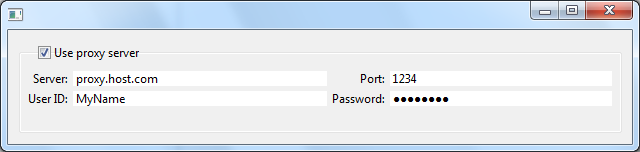
Enter the CheckboxGroup. On:


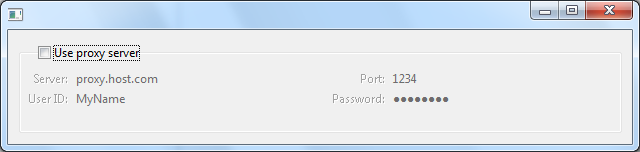
and off:


From Laurent's wiki documentation:

You can set/get the text and the font of the checkbox, and you get the value of the selection by calling isActivated(). In case you want to set the state of this checkbox programmatically (and thus enable or disable the content of the group) you use activate() and deactivate().

The content, which is a Composite, is accessible with the getter getContent().

Pretty slick! And this is only one of the 24 new widgets!  You can get the CheckboxGroup from the latest nighly builds.

Cheers,

Wim


[1] fake news


donderdag 17 maart 2016

IoT: Upcoming V3 release of the Arduino Eclipse plugin


If you are an Eclipse and Arduino fan you should definitively try this project. On April 1 V3 will be released but stable downloads are already available from the nightly section.

"With the release of version 3 of the Eclipse Arduino product, nicknamed "Toddler", Project Lead Jan Baeyens brings us the next big step in professional development for the open hardware Arduino platform. The major features of this release are single install,  auto library include and an incredibly good integrated serial monitor."

Stable nightly downloads are here [1]
Source code is here [2] 


[1] http://eclipse.baeyens.it/
[2] https://github.com/jantje/arduino-eclipse-plugin

Cheers,

Wim

woensdag 8 juli 2015

Unix Time to Date conversion in SQL for DB2 DB2/400 or iSeries or IBM i

For those of you who are in search of converting a UNIX Epoch Timestamp or whatever this is called to a readable date in DB2/400 SQL may have found this posting here [1]. However, this does not translate to the beloved IBM i SQL syntax so I converted it to something that will run on the IBM i.

The Function


CREATE FUNCTION e2d (ept INT)                      
RETURNS CHAR(23)                                    
RETURN                                              
(CHAR(DATE(INT(ept/86400) + DAYS('1970-01-01')), ISO))
|| ' ' ||                                           
repeat('0', 2 - length(rtrim(mod(int(ept/3600), 24))))
            || rtrim(mod(int(ept/3600), 24))        
|| ':' ||                                           
repeat('0', 2 - length(rtrim(mod(int(ept/60), 60))))
            || rtrim(mod(int(ept/60), 60))          
|| ':' ||                                           
repeat('0', 2 - length(rtrim(mod(int(ept), 60))))   
            || rtrim(mod(int(ept), 60))             
|| ' UTC'                                            

How to use

The timestamps can be included with milliseconds which this function does not accept so you either change the function (or let me do it for $100) or strip the milliseconds from the value.


Value in File

> select expected_start_date from item
Result:
      EXPECTED_START_DATE   
        1.368.965.867.668   
        1.369.138.667.695   
        1.369.138.667.658   
        1.423.064.635.396   
        1.356.951.946.378   
        1.369.052.267.674   
        1.358.246.021.420   
        1.370.953.067.703   
        1.369.052.267.689   
        1.369.052.267.671   
        1.413.212.245.996   
        1.366.979.412.834   

Value in File with Conversion

> select e2d(int(expected_start_date/1000)) as expected_start_date from item
Result:
EXPECTED_START_DATE   
2013-05-19 12:17:47 UTC
2013-05-21 12:17:47 UTC
2015-02-04 15:43:55 UTC
2012-12-31 11:05:46 UTC
2013-05-20 12:17:47 UTC
2013-01-15 10:33:41 UTC
2013-06-11 12:17:47 UTC
2013-05-20 12:17:47 UTC
2014-10-13 14:57:25 UTC
2013-04-26 12:30:12 UTC
2013-02-04 16:15:57 UTC
2013-02-03 23:27:41 UTC
Cheers,

Wim
wim.jongman at remainsoftware com

[1] http://www.walkernews.net/2014/02/08/db2-sql-function-that-converts-unix-epoch-time-to-calendar-date/

zondag 13 april 2014

How to contribute to Nebula with Gerrit

How to contribute to Nebula with Gerrit

This video shows how contributors can clone our git repo and supply patches through Gerrit.


woensdag 26 maart 2014

Nebula Newsletter Q1-2014 / Calling New Contributors

Here is a little summary of the work that has been going on in the Nebula Project over the past half year or so.


New Committers
Three new committers joined in 2013, Dirk Fauth for Gantt, Xihui Chen for Visualization and Cedric Brun for Paperclips. A number of patches have already been accepted and Xihui is having a lot of fun accepting multiple large patches for the same code!


We have two new committers joining the ranks. Just recently Laurent Caron joined after I invited him to get the Opal widgets from EclipseLabs into Eclipse. The code has been accepted by our legal department and after the committer paperwork is done I will help Laurent to get his widgets into our repo and build system.

We are currently running a committer vote for Mirko Paturzo. Mirko brings a lot of new energy to the Grid widget. Mirko has finished a really nice contribution to the Grid widget. Speed and memory consumption have been dramatically improved and currently Mirko is attacking the open bugs list for Grid.


Gerrit and other cool releng stuff 
Thanks to Mickael Istria we are running the smoothest Gerrit workflow. Our system is now routinely being tested after every contribution to Gerrit. Accepting patches has never been so easy.

Apart from Gerrit, Mickael has also setup a Sonar instance for Nebula. It gives you information about your code in the areas of Duplications, Coding standards, Lack of coverage, Potential bugs, Complexity, Documentation and Design. Please check it out. This brings me to:

Unit Tests
Please provide Unit tests for your widgets people!

EclipseCon Europe Nebula Talk 
I have conducted a talk about the Nebula project and introduced a lot of our widgets. I did not create a Powerpoint or Prezi presentation but instead I used that other presentation tool: RCP and Nebula widgets. You can check out the sources here: https://github.com/EclipseNebula/ECE2013. By the way, the presentation was voted #8 best talk based on number of people attending and rates given. 


Project Lead
In January, Tom Schindl resigned as co-lead. I want to thank Tom for all his work in the Nebula community over the past years. I wish him the best of luck with his current endeavors which are mostly focussed on Eclipse/JavaFX integration. Tom will maintain his Nebula committer status.
I will be soliciting for a new co-lead in the near future. So please ask yourself if this is something that you want to do.

Future of Nebula
Spring has come. In a few days I will launch a discussion about the future of Nebula. Please start thinking about the things you do not like in the project so that we can discuss and change them.


Calling New Contributors
Nebula is the easiest project in Eclipse to get involved in. We have the clearest repo structure, we have the best contributor guide, we have the least dependencies, every change you make can be build locally, we have the coolest Maven/Tycho/Hudson/Sonar build system, an advanced git/Gerrit workflow and the most welcoming and friendly project lead (me ;). We will guide your first steps into the magical realm of Eclipse and Open Source development. If you are an Eclipse newcomer and you want to hone your open source contribution skills then Eclipse Nebula is the place to start. Please reply here, contact me privately or send a mail to the nebula-dev list if you are interested.


This is all I could think of for now. If I have forgotten something, please respond here, to the nebula-dev list or in a private mail to me and I will make it right.
Happy coding,

Wim Jongman


donderdag 20 februari 2014

How to add your Hackergotchi to Planet Eclipse

I write this blog to test if my Hackergotchi appears on Planet Eclipse. Normally you ask the webmasters to insert your Hackergotchi into the relevant files but now that we have Gerrit, the only thing the webmasters need to do is to check the code and accept your patch.

This is how I added my own Hackergotchi to Planet Eclipse.


File a Bug
First I filed a bug against Community/PlanetEclipse.org. You do this by clicking on this link[1]. You also have to sign the CLA. You can do that from bugzilla.


Write down the bug number and the summary

Get your Gerrit password
Then you need to get your Gerrit password. You do this by clicking on this link[2] and sign on with your bugzilla e-mail address and password. After you have done this, a screen appears where you see your Gerrit credentials. Write them down.


Clone the git repository 
Go to the command line and surf to the place where you keep your git repos and type

git clone https://GERRIT_USER_HERE@git.eclipse.org/r/planeteclipse.org/planeteclipse.org

Then go into Eclipse, open the "Git Repository Exploring" perspective, click "Add an existing local git repository to this view" and pick the planet eclipse repository that you have just cloned.


Then import the "planet" project:

Changing the content 
Create a Hackergotchi. Mine is about 90x120 and you should also be in this range. Be creative. Make sure you have a transparent background. Once your Hackergotchi is created, open the package explorer and find the "planet" project. Then open the "output/images" directory and place your Hackergotchi in the "faces" directory. 

Then open the "eclipse/feeds/community.ini" file (open in text editor) and find the link to your blog. Then just below the entry, make sure to put the following content just below your blog entry. 

[http://industrial-tsi-wim.blogspot.com/feeds/posts/default/-/Eclipse]
name = Wim Jongman
face = wim.png
facewidth = 96
faceheight = 122

Your name should already be there and the "facewidth" and "faceheight" variables should exactly match the image dimensions. The "face" variable should exactly match the name of the image you placed in "output/images/faces".

Commit your changes 
Committing your changes to Gerrit requires some additional steps. First write down the bug number in the format I show here:

bug xxxxxx - bug summary


(click 1)
(click 2)

Click on the project and select "Team/Commit ...". You have to add a Gerrit change-id and you have to sign-off the change. Then press "Commit"

Push to Gerrit
Again go to the "Git Repository Exploring" perspective and right click on the planeteclipse.org repo. Then select "Push to Gerrit ...":


On the dialog that appears type "master" in the field that follows "refs/for" in "Gerrit Branch". Then in the Login dialog box you type in your Gerrit password.


When EGit congratulates you with the push, you will see a link that looks something like this:


You should also be able to find it in Gerrit under "My/Changes"

Go to the bug again and enter this link in a new comment.

Happy Hackergotchi,

Wim

zondag 19 januari 2014

MDialog and MWizardDialog supported by the E4 Model Editor

We have added support for the new E4 model elements. We ask you to play with this and help us figure out what additional API these parts need.

To install the new E4 tooling you need to be on Luna M4 which can be found here (by the time of this writing).

Then you need to install the latest integration build of the model tooling which can be found here.

After installation and restart you can play with the live model editor to see these new elements in action.


donderdag 9 januari 2014

CTRL+1 CTRL+1

CTRL+1 is the Eclipse quick-fix key. I use it all the time but sometimes it predicts my intentions incorrectly. Take for example the following code:


I position my cursor on the field "composite_1" to rename it and press CTRL+1. What happens is the following: The tooling knows that my source contains errors and jumps to the next nearby problem to display the quick-fix options. Nice, but not what I wanted.


To get back to my original cursor position I press CTRL+1 again. The cursor jumps back and opens the quick fix dialog again but now on the correct position:


You probably knew this one but I thought I tell you anyway, just in case.

Cheers,

Wim

woensdag 11 december 2013

Manage your Eclipse Preferences with the Workspace Mechanic

Summary

Workspace Mechanic is a tool that will manage your Eclipse preferences. I recommend that you start using it. This blog tells you why and how.

What problem does it solve

Every time you start a new workspace in Eclipse, the preferences will be "reset" to their default values. This is extremely frustrating because it takes a lot of time to find all your carefully crafted settings and re-apply them. For example, one of the preferences that came up lately [3] is "Completion overwrites":


Unfortunately, the default is wrong (at least for me). The number of times I have changed this setting are countless. I want to set this preference only once and let a tool manage it for eternity. For every new and existing workspace. Interested? Read on.

Workspace Mechanic

I had heard about Workspace Mechanic before but never gave it much attention until I read this bug posted by Markus Kuppe. Markus wanted to have this tool in the default Eclipse distributions so I figured it was time I gave it a spin. Markus also provided a set of preferences to kickstart the configuration [2]. I like it so much that I'm even writing a blog about it.

First, a tip-of-the-hat to Robert Konigsberg for writing this tool.

What does it do

Workspace Mechanic will monitor your preferences and detect if one or more of these is not according to your.. well.. preferences! 

Workspace Mechanic has a little indicator to tell if your preferences are out of sync. It optionally shows a pop-up that will enable you to set them straight.


You can also double-click the icon and Workspace Mechanic will set the out-of-sync preferences to the prefered state.

Configure Workspace Mechanic

Install Workspace Mechanic from its update site [1]. Then go to the command line and execute the following sequence of commands.

git clone https://github.com/wimjongman/myWorkspaceMechanics.git
cd myWorkspaceMechanics


Now we have a set of sensible preferences that we can start with but we need to copy them to a place where Workspace Mechanic can find them. One of the default places is the mechanic directory in the .eclipse directory in your home directory (replace $home$ with your home directory.)

mkdir $home$/.eclipse/mechanic

Once this directory is created, copy all the epf files from the git repo into that new directory.

cp   *.epf    $home$/.eclipse/mechanic/     // or equivalent for your OS

That's it. Restart your Eclipse switch to a few new workspaces and enjoy this great new tool. If it does not work, please look at its preferences! ;)

Yours truly,

Wim

[1] http://workspacemechanic.eclipselabs.org.codespot.com/git.update/mechanic//
[2] https://github.com/lemmy/myWorkspaceMechanics
[3]
https://bugs.eclipse.org/bugs/show_bug.cgi?id=423767
https://bugs.eclipse.org/bugs/show_bug.cgi?id=423697
https://bugs.eclipse.org/bugs/show_bug.cgi?id=423658
https://bugs.eclipse.org/bugs/show_bug.cgi?id=423642

maandag 5 augustus 2013

A Giant Leap for Eclipse RCP

It is the end of my working day so I thought I give Eclipse Luna a spin in honor of tomorrow's all day test day for Eclipse Luna M1. The reason for my curiosity was Eric Moffatt's answer to my question about the priority of the Eclipse mixed mode model that allows us to use the e4 programming model in the e3 workbench. Sure enough I got a report when Lars was doing housekeeping for bug 356511.

Lars mentioned that Eric had erected a new extension to the "views" extension point call "e4view" so I was eager to try this out. This is what I did.

Taking Luna for a spin

Pick up a copy of Eclipse Luna from the Platform download page. Look for the 4.4 Integration build link, ignore all the red you see, find the build for your platform and click on "(http)" to get the zip.


Then extract the zip and enter that directory to find the Eclipse executable and run it.

Creating the RCP application

With the information from the bug and the mailing list, I asked myself, what is intuitive? My first idea was to create an RCP application with the usual wizards and use the "RCP with a view" template and then extend this application to add an e4 view. This turned out to be exactly how it works.

I took the first step and let Eclipse generate the little RCP application for me. Once the application was generated, I executed it once to see if it worked. As usual, no problems.


Adding an e4 part

The next thing was to look for the new extension in the views extension point and there it was: 


What crossed my mind is that the extension is called "e4view". I could have been called "e4part" since the difference between views and editors is no longer there in e4. 

Another note is that Eric could have re-used the "view" extension since they both share the same structure. One thing that you get for free with that approach is the cross referencing in the manifest editor. More about this later.

Creating the part

I clicked the class* link and the editor started the "create new class" wizard. I just pressed enter because the e4 views do not extend ViewPart. After the editor was opened, I re-activated the manifest editor and added the following dependencies to my bundle.


  • org.eclipse.e4.ui.di
    This contains the @Focus annotation.
  • javax.annotation
    This contains the @PostContruct annotation.
Then I re-actived the java editor and created the following code:

package com.test.plugin.luna;

import javax.annotation.PostConstruct;

import org.eclipse.e4.ui.di.Focus;
import org.eclipse.swt.SWT;
import org.eclipse.swt.events.SelectionAdapter;
import org.eclipse.swt.events.SelectionEvent;
import org.eclipse.swt.layout.GridData;
import org.eclipse.swt.layout.GridLayout;
import org.eclipse.swt.widgets.Button;
import org.eclipse.swt.widgets.Composite;

public class E4view1 {

 private Button button;

 public E4view1() {
 }

 @PostConstruct
 public void createPartControl(Composite parent) {
  GridLayout gridLayout = new GridLayout(1, false);
  gridLayout.marginWidth = 5;
  gridLayout.marginHeight = 5;
  gridLayout.verticalSpacing = 0;
  gridLayout.horizontalSpacing = 0;
  parent.setLayout(gridLayout);

  button = new Button(parent, SWT.PUSH);
  button.setLayoutData(new GridData(SWT.BEGINNING, SWT.CENTER, false,
    false));
  button.setText("Push me");
  button.addSelectionListener(new SelectionAdapter() {
   @Override
   public void widgetSelected(SelectionEvent e) {

   }
  });
 }

 @Focus
 public void setFocus() {
  button.setFocus();
 }

}

Adding the e4 view to the perspective

Time to add this nice e4 view to the perspective. But how... I just followed a hunch and added the id of the "e4view" extension to the "perspectiveExtensions" extension point. Referencing the view (by clicking on the "Browse.." button) did not work because of the new name...


Changing the run configuration

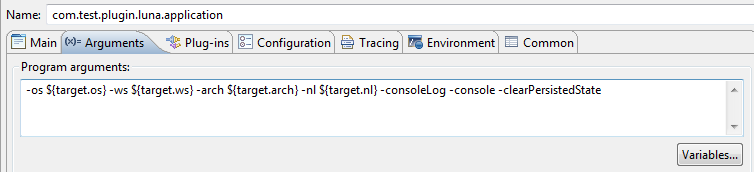
I saved all my files, opened the run configuration and added the following directives to the launcher


  • -console
    Should be a default option IMO
  • -clearPersistedState
    This will clear the e4 model and rebuild it freshly from the filesystem. I suspected that my view would not be shown otherwise.

Then I clicked on the "Plug-ins" tab and pressed "Add Required Plug-ins". Subsequently I added all plugins with "gogo" in the name (3) and I added "org.eclipse.equinox.console".

Running the mixed mode application.

Then I pressed "Run" and behold; A truly mixed mode application appeared where my dependency injected view co-existed with a traditional e3 view.


One small step for [a] man but a giant leap for Eclipse RCP

In my opinion this is the most important step in the history of Eclipse 4. This opens the door to start exploring the new programming paradigm for everyone.  This seemingly little change truly is the bridge between old and new and I predict that we are in the rapids. Things could be happening real fast now the platform team has crossed this threshold. Companies can start working on the transformation from old to new, upgrading view by view which will trigger new ideas and changes.


photo by Robert J Moffatt

Why Eclipse 4?

Curious why you should go to Eclipse 4? I have created a blog about this a while ago. You should definitively read it.

Thanks..

Thanks to the platform team for this change and getting up to speed with the mixed mode changes so early in the development cycle of Luna. Great job!


Cheers,

Wim

dinsdag 25 december 2012

Running the Apache Felix Webconsole from Eclipse

I have been told about the Apache Felix Web Console a couple of times. During all of these occasions the guy telling me this had this peculiar look in his eyes. The look that makes you think: "Okay dude, I can see that you are serious. I have to check this out." 


The first time I went down there I tried to follow the described steps. The page talks about an "all-in-one" install but it was nowhere to be found. Then I tried to install the individual components from the Felix download site but for some reason I went from one un-resolved dependency to another. So, at that point, they lost me.

Documentation... Once you are the expert you don't see where the newcomer gets lost. I am all to familiar with this. I believed we had created the easiest installation webpage for the Nebula community until I witnessed people trying to install.  

A few days ago I tried again, and basically with the same luck, so I started whining and left it again. However, it kept bugging me and I decided to finally research it until I was finished. And, you guessed it, it turned out the be quite easy.

Installing Apache Felix Webconsole into an Eclipse Installation

I am running a fresh copy of the Eclipse Classic installation. The first thing I did was to install the Felix webconsole. I downloaded the Web Console jar file from the Felix download site and dropped it into my Eclipse dropins directory.


Next I installed the three dependencies that are mentioned on the webconsole homepage:
  • Apache Commons IO
  • Apache Commons FileUpload
  • JSON
All of the above dependencies can be found in the Eclipse orbit repository. So I visited the Eclipse Orbit site and clicked on the download link to the right of the page. I always choose one of the latest stable builds and this is the link. That page contains the link to the P2 repository. 

Inside Eclipse, I fired up the "install new software" dialog and installed the three plugins. Please take care of the following:

Web Console needs an older version of commons io, version 1.4.0.  

Un-tick the "show only the latest.." checkbox in the dialog as indicated in the picture and select the three features from the list.


This should result in the following confirmation window:


Press Finish and restart.

Starting the Apache Felix Webconsole


The Web Console needs a web server to serve its pages. Fortunately, Eclipse Classic comes with a build-in web server called jetty.

After Eclipse has restarted, open the console view. From the console view, select to open the host OSGi console:


On the console prompt type "ss jetty"


I have number 93 so I type "start 93"


As you can see from the error, there is a socket error. Permission Denied. This is probably because jetty wants to start on a low port. And this is not allowed if you are not root. So, we need to tell jetty that it has to start on a high port.  Fortunately, this is documented on the webconsole homepage. Cool. It instructs you to pass the java system property:

-Dorg.osgi.service.http.port=8888

We can do this by adding this property to the eclipse.ini file and restarting.


Back in the Eclipse console we start jetty again and this time it is successful.  So, let's visit the webconsole and do a little dance:


Aiiii. It is not working! Why? We also need to start the webconsole bundle. 

"ss webconsole"


And now it works. Pretty cool!

Best Regards,

Wim


[1] http://felix.apache.org/site/apache-felix-web-console.html

zondag 7 oktober 2012

Why Eclipse e4? (the Egg Laying Woolmilkpig)


The Germans have a great expression for something that is supposed to do everything. They call it "Die Eierlegende Wollmilchsau" and it is a combination of a pig, a sheep, a cow and a chicken. It is the ultimate machine that replaces all others. How does this translate to Eclipse e4 RCP? 


We have started a cooperation with vogel/a GMBH and we have been trained by Lars in e4. The training lasts 5 days and it covers everything you need to know about creating an e4 application. E4 RCP consists of the new e4 specific technology combined with existing stuff like SWT and JFace.

The reason why I joined the course is to get up to speed with the latest RCP developments. Here is a document of my experiences and why I think e4 RCP is better than Eclipse 3 RCP.

My initial state of mind

I did not think e4 was really something that would shock me. After all, I am a seasoned RCP 3 developer and have trained many people in how to use the framework. Sure, the application model looked nice but I really did not consider it to be more than an improved manifest editor. 

I lost some interest during the development phase because I saw a number of things fall off the wagon, like XWT and OpenSocial integration.

What I did not realize is that I missed the point about core e4 technologies.  

Now that we know the gems of e4, we have decided to stop offering our courses based on the old Eclipse 3 RCP applications and completely switch over. E4 is the future for Rich Clients. and when we say Rich Clients, we don't just mean Desktop.

Let me try to explain why I think you should switch to e4. 

Reason 1, The 4th Generation of Frameworks

A 3rd generation framework, like Eclipse 3 RCP, can be viewed as a big scaffold that you use to build your application with. In contrast to scaffolds IRL, this scaffold never goes away and it will forever surround your application. 

If you use such a framework to create something, you typically extend or implement a class and implement the required methods. To give an example, to build an Eclipse View in Eclipse 3 RCP you need to extend ViewPart and because you need to do that, the scaffold needs to stay in place to support your application. 

Not only does this literally tie your application to the framework, another drawback of this mechanism is that code cannot be reused. I cannot use ViewPart outside the Eclipse RCP framework and if I wanted to re-use the user interface elements of a ViewPart inside the framework (for instance in a Wizard) then this is really hard and often requires serious refactoring.

In Eclipse e4 you do not extend or implement framework classes because you strictly work with POJO's. All hooks into the framework are based on annotations which are completely ignored if used outside of e4.

The supporting function of the e4 scaffold is much less then the old RCP. This means that an application based on e4 can be refactored to remove the framework. This is much harder in a third generation framework like Eclipse 3 RCP*.

do I hear impossible? Going once, going twice ... 

Reason 2, No API, No Cry.

(Girls, just swap "Man" and "Woman")
An extensive knowledge of the API is required in order to comfortably interact with the features of a framework. If you are a successful user of the Eclipse 3 RCP, then I congratulate you with your tremendous capacity to store abstract information in your brain. You must not only remember the various components that you use but also know where to get them. 

This has been inverted. You no longer ask for stuff through an API but you let e4 inject it.

Suppose you want to do something simple as calling back the UI thread to update the user interface. The only correct way* in Eclipse 3 is to ask the workbench object like in this code snippet:

Display display = PlatformUI.getWorkbench().getDisplay();
display.asyncExec(runner);

This has been replaced by the following code:

@Inject Display display;
display.asyncExec(runner);

No more tedious searches to get the framework objects. You just let e4 inject everything directly into your POJO. "But I already know the API", you might say. But what about your new co-workers? (see reason 7) 


Reason 3, The Dynamic Application Model.

E4 uses a dynamic in-memory model of the running application. The dynamic nature of the application enables you to create, change and destroy model elements at run-time.

For example, it is very difficult to hide views from users in old RCP applications. One often needs guarding code inside the view to prevent the user from accessing it's content. There is no real concept of hiding views, especially if you also deploy your applications as plug-ins. In e4, you can iterate through your model, and based on the security level of the user you can perform actions (like deleting protected views from the model altogether)

Model elements like views and commands can be tagged. Tagging enables you to add domain specific information to the e4 application model. These tags can be read at run-time and based on their values you can apply application logic.

As an other example, you can generate a user interface completely from an empty model. Suppose you have a tool that generates an application. Instead of generating code in a static way, you could interpret information from a database and generate a user interface on the fly.

Reason 4, Dependency Injection FTW.

The e4 components are managed by the Dependency Injection Manager. The general concept of the Eclipse D.I. Manager is fairly simple; the various components of the e4 framework maintain a parented hashmap that contains all object instances that the D.I. framework can inject. This parented hashmap is called the D.I. Context.

I promise it will not hurt.
For example, the Eclipse bootstrap code is responsible for creating an instance of the Display class. This instance is then placed into the D.I. context. If any of your model objects (views, windows, menu's, handlers) require the correct instance of the Display class, it is simply injected by D.I.

Now what makes D.I. really super-super-cool and powerful is its capability to also create and maintain your own components. Consider the following class:


If you ask the D.I. framework an instance of this SomePoorClass then it will first check the D.I. Context if the object already exists. If it does not, it will create it courtesy of the @Createable annotation. Not only will it be created but also the dependencies annotated with @Inject will supplied. As an additional bonus, if any of the injected objects change in the D.I. Context, they will automatically be updated in the SomePoorClass instance. If I would tell you this during the training, you would have noticed that my voice has shifted one octave to the higher pitch. Pure enthusiasm. Super-super cool!

Reason 5, Communication

Eclipse e4 is using a global event notification system. It is based on the Equinox implementation of the OSGi Event Admin Service specification.
A special simplified class is placed on top of this implementation and is called the IEventBroker. The implementation dictates that an event can be send with send(..) or post(..). The passed parameters are the topic string, which is a "/" delimited string and an associated object called the payload.  The difference between send and post is that the former is synchronous and the latter is not. 

In addition, you can use the broker to add a listener that will be called when a topic of interest arrives. 

However, with the e4 D.I. framework in control there is really no need to register such a listener.

You can ask e4 to inject events directly into an interested method. Setting up an event listener becomes a trivial task.  


In this way you can handle your own events or tap into the events send by the framework. We all use the same global event bus.

Reason 6, GUI Independent Rendering Engines

As you know, Eclipse and SWT are married. It appeared to be a solid marriage but after Eclipse has discovered the temptations of the internet she is not so sure she want to be so monogamous as she used to be. 

The Platform developers have equipped Eclipse with a GUI independent rendering framework. 

As a result of this, there are several experiments with alternative rendering engines. Please check Kai Toedters work on Github, the e4 SWT to Web work by the RAP team, the blog describing the RAP rendering experiments of Ralf and Lars and there is a rendering engine on github for Vaadin by Rushan R. Gilmullin

A special mention goes to the JavaFX rendering engine by Tom Schindl. Tom has spent a lot of effort in this engine and creating JavaFX integration for Eclipse

This promises to take the framework you already know and love to render outside of the desktop. How cool is this?

Reason 7, Steep Learning Curve / Shameless Pitch

First let me tell you my own experience. 6 weeks ago, I had next to nothing e4 experience. Going through the vogel/a course, it took me 2 days to understand what was going on. Like I already said, I am an experienced Eclipse 3 RCP developer. It took me another week or so of fairly intense study to make me confident enough to teach e4 to others. For this study I used the e4 book Lars has written, the content available in the e4 wiki, the source code and the vast experience I already acquired through the years. 

For me, the learning curve was very steep. Meaning that I could acquire a lot of information in very little time. Since then I have seen what the training did to other experienced RCP developers and it was basically the same. After two days the e4 concepts were clear. The other days were used to learn additional framework capabilities based on the concepts.

To me and the other experienced RCP developers there was no doubt about the power and simplicity of the new framework. The concepts are totally cool.

Another experienced programmer which had never done anything with Eclipse or SWT but had developed a large Swing application, was completely convinced of the powers of Eclipse e4 and OSGi. He had fully understood the concepts and was able to create an e4 application from scratch within a couple of minutes. 

Can you do it without training. Sure. Go to Vogel/a's website and look at the wealth of information available. If that is not enough, go to the forum and ask questions. If that takes to long, buy the book. However, there is nothing like a good old crash course to erect the learning curve.

Be aware that my company has adopted the same course materials and approach. So this last reason can be seen as a shameless pitch. However, there is the topic of my reputation.


Questions and Answer

Q. Must I Switch to e4 RCP? 
A. Yes. If your code is based on Eclipse technology you must move on. 

Q. Do you need to switch today.
A. No, but do not dwell in old RCP. Be decisive and start planning the conversion process. Plan new projects to be developed in e4.

Q. Is the training really needed?
A. Only if you don't want to waste time.


Q. Is e4 stable enough to host my mission critical application today.
A. Today? No promises but it is getting there.

Q. What do you mean? Does it contain bugs!?!
A. That is a promise.

Q. Are there more questions?
A. And answers too. Check this.

Is it the Egg Laying Woolmilkpig?

Frankly, there is no framework that can match Eclipse RCP. The problem for me with other frameworks has always been the 80/20 rule. 80% possibilities and 20% struggle. Eclipse is programmed in and with Java. Anything is possible. 

But you tell me. I love your comments.


...